Showing posts with label GAMES. Show all posts

Thursday, 6 November 2014

Avast Free Antivirus! 2014 serial key valid till 2095


avast_free_antivirus_logo
Avast 9 – 2014
If you haven’t heard of AVAST, we’re only the most trusted name in antivirus, actively protecting more than 200 million PCs, Macs and Androids. So many people trust us because we’ve been protecting devices and data for 25 years, in over 40 languages (more than any other antivirus solution), on every populated continent in the world.
And now we got the keys too

How to Activate ?

    Disable from the internet
    Install AVAST!
    goto settings registration then offline registration
    copy the serial then paste in avast
    thats it!

serial key! :

http://www.4shared.com/office/g5n--cUKce/imtiaz_avast_keys_2014.html

                   C59249769E9900N1595-ENS7ULJH

Wednesday, 19 March 2014

Make a Free USA verified Paypal Account

Make a Free USA verified Paypal Account

Make+Free+USA+Verified+Paypal+account 

 How to make a Free verified USA Paypal Account?
Today i am gona teach you how to make a USA verified Paypal account in just some simple steps. All you need to do just to follow my steps and it's 100% Free and legit . Now you dont need to buy any VCC or VBA to make your paypal account verified . Following steps will described to you how to make your paypal account a USA verified Paypal account.

Step1 : Apply For a Payoneer Debit Card.
TO make your Paypal account a verified USA paypal account you need a USA Bank account Details . How you will get your USA Bank account details ? It's really easy and ofcourse it's 100% free. When you will apply for a Payoneer Debit card then they will provide you a free USA Bank account along with your Free Payoneer Master Debit card . For applying a Free Payoneer Debit card click on the following Link,

www.payoneer.com/‎ 

signup+for+Payoneer+card  

Important:- For Applying a Payoneer Master Debit card you have needed a National identity card SCAN copy or Driving license Number or a Passport . If you have one then you can apply for a Payoneer Master Debit card . Once your card is approved they will send you an email with your USA bank account Details and also they will delivered you your Free Payoneer Master Debit card at your home .

Step2:-  How to Use your Payoneer USA Bank account Details to make your Paypal account Verified. 
As i have described above when your card will be approved then the Payoneer company will send you an email with your Bank account details . That email has your Bank account details as your Account number and the Routing Number.You can also view your Bank account details by login into your Payoneer account and then click on receive Money and then click on USA payment services.


 Step3:-  Signup for a NEW USA Paypal account.
After getting your USA Bank account Details now the Next step is to Make a USA Paypal account if you dont have one yet . Important Thing is when you will signup for a NEW paypal account at Paypal official site then this time you have to select the country as USA otherwise you wont make your Paypal account verified.

Step4:- How to add your USA Bank account details in your NEW Paypal account. 
In step4 i will teach you how to add your USA bank account details into your Paypal account to make it verified. and it's really simple. All you need to do now login into your Paypal account and click on profile and then click on add Bank or update Bank account. Then you have to add your USA bank account details there that Payoneer has sent you in your email.


Final Step:- You have a Verifed Paypal account now :) 
In this step you need a little bit patience . once you have added your USA bank account details into your paypal account then Paypal will send you two small verification transactions into your payoneer account transaction History or in your email inbox .

Payoneer+account+Transaction+History 

Remember it that it will take 1 or 2 days to appeared those 2 transactions into your Payoneer account . so check your Payoneer account or your mails inbox after 1 or 2 days . If you found those small transaction then again login to your paypal account and then again click on profile and then click on Add BANK account or update Bank account . This time paypal will ask to you add those 2 small transactions amounts there and click on continue . Now your Paypal will get verified instantly .Cheers :)
 

Get+Free+verified+Paypal+account


How Put Image in Folder Background

How Put Image in Folder Background

Put Image in Folder Background

Step  Open notepad (windows key + R type in notepad)

Step  Copy and paste the following line in your notepad.

[ExtshellFolderViews]

 
{BE098140-A513-11D0-A3A4-00C04FD706EC}={BE098140-A513-11D0-A­3A4-00C04FD706EC} 

[{BE098140-A513-11D0-A3A4-00C04FD706EC}]

IconArea_Image=C:\background.jpg

Note: C:\Background.jpg will be shown as your background image. You can Change it to your current background image path. The picture must fit your screen resolution. (its an example) can use any picture

Step Now save the file as “desktop.ini".

Step  Now copy-paste the file to any folder where you want to show the background picture.

Step wooolllllaaaaa done..!! Refresh to see the changes.

ALL USEFUL KEYBORD SHORTCUT KEYS FOR COMPUTER LAPTOPS

ALL USEFUL KEYBORD SHORTCUT KEYS FOR COMPUTER LAPTOPS 

All Useful Keyboard Shortcut Of computer ,laptop user


Hi Guys I got Suggestion to update my blog with all keyboard shortcut from my friend Khawaja Attiq So I Updated It.Getting familiar with keyboard shortcuts not only help you get the work done faster, but also more efficient. If your daily job rely heavily on using Windows, here are some 100+ Windows Keyboard Shortcuts you might want to check out. I Give Us suggestion An We will Try To Update That Content.

Shortcut is here See All

Usefull some really general shortcuts that you often used Daily.
CTRL+C (Copy)
CTRL+X (Cut)
CTRL+V (Paste)
CTRL+Z (Undo)
Delete (Delete)
Shift+Delete (Delete the selected item permanently without placing the item in the Recycle Bin)
CTRL while dragging an item (Copy the selected item)
CTRL+Shift while dragging an item (Create a shortcut to the selected item)
F2 key (Rename the selected item)
CTRL+RIGHT ARROW (Move the insertion point to the beginning of the next word)
CTRL+LEFT ARROW (Move the insertion point to the beginning of the previous word)
CTRL+DOWN ARROW (Move the insertion point to the beginning of the next paragraph)
CTRL+UP ARROW (Move the insertion point to the beginning of the previous paragraph)
CTRL+Shift with any of the arrow keys (Highlight a block of text)
CTRL+A (Select all)
F3 key (Search for a file or a folder)
Alt+Enter (View the properties for the selected item)
Alt+F4 (Close the active item, or quit the active program)
Alt+Enter (Display the properties of the selected object)
Alt+Space bar (Open the shortcut menu for the active window)
Alt+Tab (Switch between the open items)
Alt+Esc (Cycle through items in the order that they had been opened)
F6 key (Cycle through the screen elements in a window or on the desktop)
F4 key (Display the Address bar list in My Computer or Windows Explorer)
Shift+F10 (Display the shortcut menu for the selected item)
Alt+Spacebar (Display the System menu for the active window)
CTRL+esc (Display the Start menu)
Alt+Underlined letter in a menu name (Display the corresponding menu)
Underlined letter in a command name on an open menu (Perform the corresponding command)
F10 key (Activate the menu bar in the active program)
F5 key (Update the active window)
Backspace (View the folder one level up in My Computer or Windows Explorer)
ESC (Cancel the current task)
Shift when you insert a CD-ROM into the CD-ROM drive (Prevent the CD-ROM from automatically playing)

Remote Desktop Connection Navigation :)

Alt+PAGE UP (Switch between programs from left to right)
Alt+PAGE DOWN (Switch between programs from right to left)
Alt+INSERT (Cycle through the programs in most recently used order)
Alt+HOME (Display the Start menu)
CTRL+Alt+BREAK (Switch the client computer between a window and a full screen)
Alt+Delete (Display the Windows menu)
CTRL+Alt+- (Place a snapshot of the active window in the client on the Terminal server clipboard and provide the same functionality as pressing PRINT SCREEN on a local computer.)
CTRL+Alt++ (Place a snapshot of the entire client window area on the Terminal server clipboard and provide the same functionality as pressing Alt+PRINT SCREEN on a local computer.)

Internet Explorer Navigation...

CTRL+B (Open the Organize Favorites dialog box)
CTRL+E (Open the Search bar)
CTRL+F (Start the Find utility)
CTRL+H (Open the History bar)
CTRL+I (Open the Favorites bar)
CTRL+L (Open the Open dialog box)
CTRL+N (Start another instance of the browser with the same Web address)
CTRL+O (Open the Open dialog box, the same as CTRL+L)
CTRL+P (Open the Print dialog box)
CTRL+R (Update the current Web page)
CTRL+W (Close the current window)
I hope It is useful for u....
Enjoy !

Wednesday, 12 March 2014

how to embed flash files in blogger?

If you want to embed flash in a particular page only -
then follow the below steps:


  • log in your blogger account
  • go to dashboard
  • make a new post
  • after writing your post simply at the end switch on from compose mode to HTML mode .


then anywhere in the post  use the code,where you feels like to embed  flash object ,between <br />      <br /> tag.

code:

<embed type="application/x-shockwave-flash" src="http://Paste the link here(delete extra code after.swf)" pluginspage=" http://www.macromedia.com/go/getflashplayer" height="101" width="400"></embed>

You can edit the code and adjust the height and width.
You can also change the quality of the flash animation quality=low/high/ accordingly.
In the above code where it says paste the URL of the file uploaded means that you have to upload the flash file to some file hosting site.You can skip the  method stated below  if you are already having the link,simply use it.
how to upload the swf file:
 Unfortunately Blogger does not allow us to upload swf files but we can upload files to google sites and get the links after uploading.


  • open : sites.google.com
  • sign in using your Google account
  • choose any template and provide a unique website name(any name )
  • now go to more / manage site /attachments and upload the .swf file


  • After uploading... right click on download link and "copy link address "
  • and past the URL in the above code.

note: make sure to delete some redirect code after .swf in the copied link address to make it work and 

Then save and switch back to compose mode in blogger ,publish your blog.
 Visit your blog and enjoy the flash object embedded.
If you are unable to see the flash file after visiting your blog then make sure that you are having flash player ADD-ON enabled on your browser.

how to remove navbar in blogger


Disable navbar from your blog

Many publishers wants to hide the navbar in blogger because it looks more professional without it. Quick easy and simple way to remove the navbar from your blogger blog. No need to edit HTML of configure any script. log in your blogger account then see the steps required.
steps required.


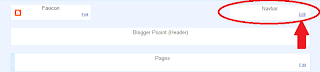
  • go to dashboard
  • click layout


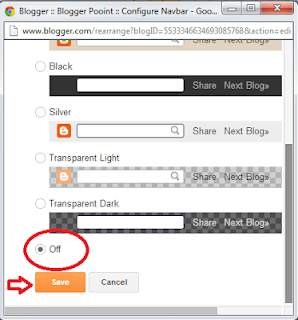
  • click on edit navbar option


  • select off and then save.

Disable right click in blogger

Protect your blogs:

This tweaks helps bloggers to disable right click on the blog.
make your content copyrighted in the sense that it disables right click .
This can save you contend and hard work from directly being copied.
This is an awesome tool, just add few codes
in HTML widget and enjoy!

here is the code:


<script language=javascript>
<!--

//Disable right mouse click Script
var message="copyrighted";

///////////////////////////////////
function clickIE4(){
if (event.button==2){
alert(message);
return false;
}
}

function clickNS4(e){
if (document.layers||document.getElementById&&!document.all){
if (e.which==2||e.which==3){
alert(message);
return false;
}
}
}

if (document.layers){
document.captureEvents(Event.MOUSEDOWN);
document.onmousedown=clickNS4;
}
else if (document.all&&!document.getElementById){
document.onmousedown=clickIE4;
}

document.oncontextmenu=new Function("alert(message);return false")

// -->
</script> 

you can also change the messageyou want to displayed when right click is pressed 
on your blog. just make a change where copyrighted is written to your own message 
to be displayed:

//Disable right mouse click Script
var message="copyrighted"; 


Tuesday, 11 March 2014

Download Cracked Adobe Dreamweaver 4 html editor

Download Cracked Adobe Dreamweaver 4 html editor

Download Cracked Adobe Dreamweaver 4 html editor

Summing up the all of the benefits you get from choosing Adobe Dreamweaver is difficult.Never before has a program done such an amazing job at opening previously closed doors in web design to people who were otherwise shut out of the craft. From start to finish, it helps you during every step of the design process. To top it off, you will be satisfied every time you decide to create a website using this excellent HTML editor program.

Adobe Dreamweaver has a streamlined interface that cuts down on the time you would usually spend looking for a specific design tool. While other programs get very technical to cater to a more experienced crowd, this one has the goal of making the art of designing web pages accessible to anyone who wants to take part. You don’t have to be a coding expert or a graphic designer to be able to design polished web pages with this industry-leading program. It gives you all the tools you need to create the best website possible.

Download Desktop Icon Toy 4.7 cracked


Download Desktop Icon Toy 4.7 cracked


Make your desktop icon beautiful and good looking arrangement with icon toy 4.5
here is few images
Download Desktop Icon Toy 4.7 cracked

Download Desktop Icon Toy 4.7 cracked

Download Desktop Icon Toy 4.7 cracked

Download Desktop Icon Toy 4.7 cracked


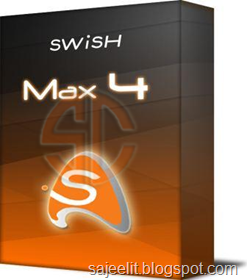
SWiSH Max 4 - The Ultimate Flash Creation Tool

SWiSH Max 4 - The Ultimate Flash Creation Tool

SWiSH Max 4 - The Ultimate Flash Creation Tool\
Advanced Flash Creation Tool For The Graphic Artist Or Web Professional, Creates Stunning Flash Animations and Websites with Ease , Includes over 350 Preset Multimedia Effects , Includes over 180 Ready-to-use Components and Vector Shapes.Import Images, Graphics, Sound and Video from all popular formats
Export Presentations to Flash, Video, EXE, GIF Animation or Image Sequence Powerful Scripting Language for Advanced Users Tools to Control Motion, Draw Shapes, Edit Text, and more Project templates - Instant Results Using the Wizard Panel Drawing Tools - Shape Operations, Knife Tool, Component Tool Improved Motion Path - Editable Bezier Curves, Convert a Shape to Path.


Monday, 10 March 2014

VSO DOWNLOADER ULTIMATE 3.2.0

VSO DOWNLOADER ULTIMATE 3.2.0

VSO Downloader
VSO Downloader Ultimate is a multimedia downloader to grab streaming videos and audio from thousands of websites like Youtube, Metacafe, Vimeo, Dailymotion etc. The program sits in the background and can be set to automatically download media as you surf. VSO Downloader Ultimate does not depend on any browser, it automatically detects when you are watching an online video and downloads it to your hard drive. It is a simple tool that is easy to use, it automatically detects the current video and downloads it to your hard drive. The application is entirely customizable, for example, you can automatically download all the detected videos, launch several downloads simultaneously, etc. Additionally, thousands of more media sources will be covered through support for HTTP and HTTPS protocols.
Files can be renamed as they are being downloaded from remote servers, and the engine ensures the highest possible speed is achieved. If a download stops, it can be resumed later. It supports VPNs and proxy servers too.
VSO Downloader Ultimate has got a simple interface. Simple run the program and it will automatically keep track of any videos that you watch online. There is no need to manually add any URLs, it will automatically download the videos that you are watching to your hard disk. The program comes with an Ad Blocker and ensures that ads are not downloaded. Supports download resume and it is also compatible with HTTP, HTTPS protocols. You can configure the program to limit the number of files it downloads at a time or the number of threads to open per download. You can also filter the downloads by a minimum file size. The program will download the videos in its original format as it does not come with any converter.
VSO Downloader Ultimate Key Features:
Totally Free
• 100% Clean and free. No adware and spyware, or toolbars
Compatible with thousands of sites
• VSO Downloader Ultimate is compatible with thousands of video and audio streaming sites
Streaming detection
• detects and downloads media (audio + video) files with any browser
• no need to copy and paste urls – media is detected automatically
• rename files as you are downloading
Ad Blocker
• detects ads and does not download them
User friendly file names
• smart automated file renamer is integrated
• manual file renaming during download is also possible (F2)
Extra Light
• Uses the least amount of system resources possible at all times
• Uses less than 5MB of memory

AVS REGISTRY CLEANER 2.3.3 (FULL VERSION)

AVS REGISTRY CLEANER 2.3.3 (FULL VERSION)

AVS Registry Cleaner
AVS Registry Cleaner is a special utility that enables you to check and manage the Windows registry with just a few mouse clicks. Also it lets the user scan, clean and fix your PC Windows registry, remove obsolete, harmful or unused items from the registry and make the personal computer operate safe and fast. AVS Registry cleaner identifies and ensures safety of crucial registry entries, has compatibility at its best and works in synchronization with popular pc software. AVS Registry Cleaner scans your registry for invalid items and presents you with a list of results. You can then choose to remove the checked keys or add them to an exclusion list. In addition to cleaning your registry, the program can also remove common junk files, temporary Internet files and broken shortcuts. Other features include automated registry backup and restore of the registry entries and backup can be scheduled as per convenience. Keep the registry size smaller and enhance your computer performance.
• Clean and Fix Windows Registry
Scan different registry categories like uninstalled entries, shared DLL’s, COM/ActiveX, file extensions, etc. Remove incorrect data that slow down your computer.
• Remove Junk Files from Your PC
Detect and delete temporary Internet files, corrupted applications, trash files in the recycle bin, etc.
• Make Registry Backup within Seconds
Make a backup of the files for maximum safety. No crucial registry entries are removed!
• Scan PC Registry Automatically
Set up AVS Registry Cleaner to scan your PC even when you are absent. Schedule time and select file categories for scanning.
• new! Microsoft Windows 7 Support
AVS Registry Cleaner is compatible with the latest version of Microsoft Windows.
• 64-Bit Windows Support
AVS Registry Cleaner is compatible with the latest version of Microsoft Windows 7 including 64-bit version. Windows 64-bit Vista versions are also supported.
• Strong Program Compatibility
AVS Registry Cleaner is compatible with office-, graphics-, anti-virus- and other software installed on your PC.
• Multilingual Support
AVS Registry Cleaner interface and tech-support are available in English, French, German, Spanish, Italian and Japanese.
Supported OS: Windows XP, Server 2003, Vista, Windows 7, Windows 8.

MAGIX VIDEO PRO X6 V13.0.3.24 (FULL VERSION)

MAGIX VIDEO PRO X6 V13.0.3.24 (FULL VERSION)

MAGIX Video Pro X6
MAGIX Video Pro X6 is a highly sophisticated video editing solution geared towards the unique requirements of ambitious and professional users. The multiple award-winning video workstation offers an unrivaled range of powerful editing tools and sophisticated virtual equipment for detailed audio dubbing. Optimized workflow layout and unique performance tools guarantee precise editing that will turn your vision into a reality. State-of-the-art digital technology, innovative functions, and the accumulation of years of expert experience in the field of video and audio combine to guarantee professional results in perfect sound and vision. MAGIX Video Pro X6 features a 3-point cut function that makes inserting video clips into the timeline even easier.
Choose a position in the arrangement where you wish to insert a clip. Then simply add a start position to the file you want to import. The computer automatically calculates the cut points and precisely fills in the gaps in the timeline.
MAGIX Video Pro X6 is the perfect software solution for intuitive and powerful video production. This multi-award-winning video editing suite, which is geared towards the unique requirements of professional users, offers an unrivaled range of powerful post-production tools. Improved performance, detailed editing options and years of experience in the field of advanced software development guarantee professional results in perfect sound and vision and an efficient workflow that combines professional video editing with ease of use. Now with 64-bit support.
MAGIX Video Pro X6 Top features:
• Native 64-bit application
• Support for professional formats (XDCAM, AVC Intra, DVCPRO, ProRes and more)
• Scalable proxy editing
• Primary and secondary 3-way color correction
• Multicam editing on up to nine tracks.
• Full Stereo3D support
• Expanded 4K support
• Precise Surround Sound audio editing in broadcast quality
• Disc authoring for DVD, AVCHD and Blu-ray Disc
• Broadcast quality file export with batch processing
• Top quality bonus plug-ins from proDAD and Red Giant

AUSLOGICS REGISTRY CLEANER 3.5.1 (FULL VERSION)

AUSLOGICS REGISTRY CLEANER 3.5.1 (FULL VERSION)

Auslogics Registry Cleaner v3.2.0
Auslogics Registry Cleaner will scan your computer for registry errors and problems, and fix the Registry, increasing PC performance and stability. It’s absolutely safe to use, fast, and FREE. Keeping the Registry clean and error-free is the key to optimal computer performance. Auslogics Registry Cleaner will help you get rid of registry errors and make your computer as fast as ever. Auslogics Registry Cleaner is an application which can deal with all the problems that you might have with your registry. It will optimize your Windows Registry and ensure fast, stable, and error-free computer performance. Even if your PC is fairly new, Auslogics Registry Cleaner will make sure it stays in perfect shape. With Auslogics Registry Cleaner you won’t have to pay for expensive hardware upgrades or computer technician’s time. In fact, you won’t have to pay at all because it’s 100% FREE.
Auslogics Registry Cleaner doesn’t try to find as many problems as possible. It only deletes safe items by default. Novice users should only clean those items. However, advanced users can select the Advanced scan mode to scan categories with higher risk level. By default Auslogics Registry Cleaner will delete only safe-to-delete items.
Features of Auslogics Registry Cleaner:
• Fixing registry errors will speed up your computer.
• Registry cleanup will reduce the size of the Windows registry.
• This is one of the most popular registry cleaners on the Internet.
• Auslogics is recommended by industry experts.
• It is easy to use and absolutely FREE!
Supported OS:  Windows XP, Vista, Windows 7, Windows 8, Windows 8.1 (32-bit & 64-bit).

MOVAVI VIDEO CONVERTER 14.0.1 (FULL VERSION)

MOVAVI VIDEO CONVERTER 14.0.1 (FULL VERSION)

Movavi Video Converter 14.0.1
Movavi Video Converter is a leading video converter you can use to convert video and audio, save for portables, rip & burn DVD. Converts to and from high definition video formats. Movavi Video Converter rips video from unencrypted DVDs and converts into any media format. It features quality loss transference of multichannel audio from DVD when you rip video and convert to AVI format. Movavi offers accelerated DVD conversion with CUDA-enabled GPU – rip video and convert files from DVD to iPod at 10x the speed! Save soundtracks from video and DVD. Use our video format converter to save movie frames into image files. Advanced users are sure to appreciate the manual adjustment of such parameters of output media file as bitrate, aspect ratio, etc.
Movavi video file converter lets you set the quality and size of the output file. Play any video — including HD and DVD — and audio with the totally free Movavi Video Player included in the Video Converter software installation pack.
Movavi Video Converter supports more than 180 video, audio, and image formats. When you convert video to MPEG-4, MPEG 1-2, H.264, WMV, or FLV (with H.264 codec) with the same input and output video parameters, you can activate Automatic Bitrate. This feature ensures the best balance between size and quality for the converted video by automatically selecting the optimum bitrate values. If you’re not sure which bitrate is the best, just choose “Auto” bitrate in the Settings window.
• Convert Video, DVD & Audio. Convert video, DVD & audio between more than 170 media formats, including HD. Whether you’re experienced or just starting out — our video converter offers both convenient ready-made format presets for output files and the ability to manually set the parameters of the output video.
• Edit, Adjust Quality, Play Back. With Movavi Video Converter, you can not only convert video and audio files but also perform basic editing tasks and adjust video quality. Using the free Movavi Video Player included in the Video Converter installation pack, you can play any video files — including DVD and HD — right on your desktop.
• Save for 180 Devices, Burn DVD. The video converter’s predefined settings allow to convert video and audio for 180+ mobile devices: Apple iPod, iPad, iPhone, Sony PSP, Zune, BlackBerry, Nokia, HTC and more. Burn videos to DVDs in the burning mode of the video converter.
• Convert Video 800% Faster. Convert Video 800% Faster Movavi Video Converter is optimized for NVIDIA CUDA, resulting in a 8x gain in conversion efficiency on PCs with CUDA-enabled graphics card and 10x with multiple GPUs. The program also ensures significant performance gain on AMD and Intel multi-core processor.
Movavi Video Converter supports GeForce, GeForce Mobile, Quadro, and Quadro Mobile graphics card series from NVIDIA. Please click on the card series to open/close the full list of supported cards.
Movavi Video Converter is optimized for NVIDIA CUDA ensuring accelerated video decoding/encoding on a CUDA-enabled graphics card. The significant — up to 8 times — performance gain means prompt HD and SD video conversion, smooth playback and highest quality for all your favorite movies. Because Movavi Video Converter shifts video processing from your computer’s CPU to NVIDIA’s GPU, your computer’s CPU is fully available for use by other tasks.
CUDA technology saves you time when converting AVI, MP4, FLV, MKV with H.264 codec, MPEG (MPEG2 PS, MPEG2 TS) with MPEG1/MPEG2 codec to AVI, FLV, MP4 with H.264 codec. Now, you can instantly see which conversion formats leverage CUDA technology — making conversion considerably faster — by the CUDA logos shown alongside those format presets.
Input Video Formats: AVI, DV AVI, MPEG 1,2, MP4, WMV, ASF, 3GP, 3GPP, 3GPP2, MOV, QT, VOB, IFO, MOD, DAT, M2T, MTS, MKV, VRO, FLV.
Output Video Formats: AVI, MPEG 1,2, MP4, WMV, 3GP, 3GPP, 3GPP2, MOV, QT, RM, RMVB, FLV, M2T.
Input/Output Audio Formats: MP3, WAV, WMA, OGG, AAC, FLAC, Monkey’s Audio.
Input/Output Image Formats: JPEG, PNG, BMP, GIF.
Operating Systems: Windows XP, Vista, Windows 7, Windows 8 (32-bit & 64-bit).